Tuesday, 25 March 2014
The complete Voiceover
This is the voiceover that used to be on the title sequence, I like the voiceover as a whole and i'm disappointed that it doesn't fit well with the title sequence as a whole. I think it sounds professional because we recorded it in the music studio in school so it was clear and easy to edit. Christian edited the voiceover on Logic Pro on a MAC to create a mysterious feel to the speech, it was also slowed down to fit more into the title sequence and to space out. The speech was also cut so the two characters took turns saying a part of the script instead of all at once like it was recorded.
I think this was a successful piece of work but our title sequence soundtrack 'Dangerous Knowledge' was more effective without voiceover over the top.

Reshooting
 Due to the lack of time we had, we decided to go to the science tech room and pick up some science like objects that a Doctor may use and filmed in a science classroom due to the lack of time we have to get our coursework altogether. Despite filming in school, I think the image we got from filming in a science classroom looked better than what we could have made look professional outside school. In total we took 7 clips that were successful but when putting the title sequence together it made the length of it 10 seconds longer which made us more comfortable with the length as we learnt that the minimum time is 1.30 minutes and we had 1.36 minutes.
I think this reshoot has made our title sequence more successful and shows Christian's character more clearly that he's a doctor or gives the audience the hint that Christian plays a medical and more older character.
Class Feedback
In class we showed the other students our title sequence and received coursework from other people in the lesson and the teacher. I think our feedback has helped me a lot and everyone's ideas were supportive. We handed out feedback sheets and gave them to the class to fill out and these were our results.


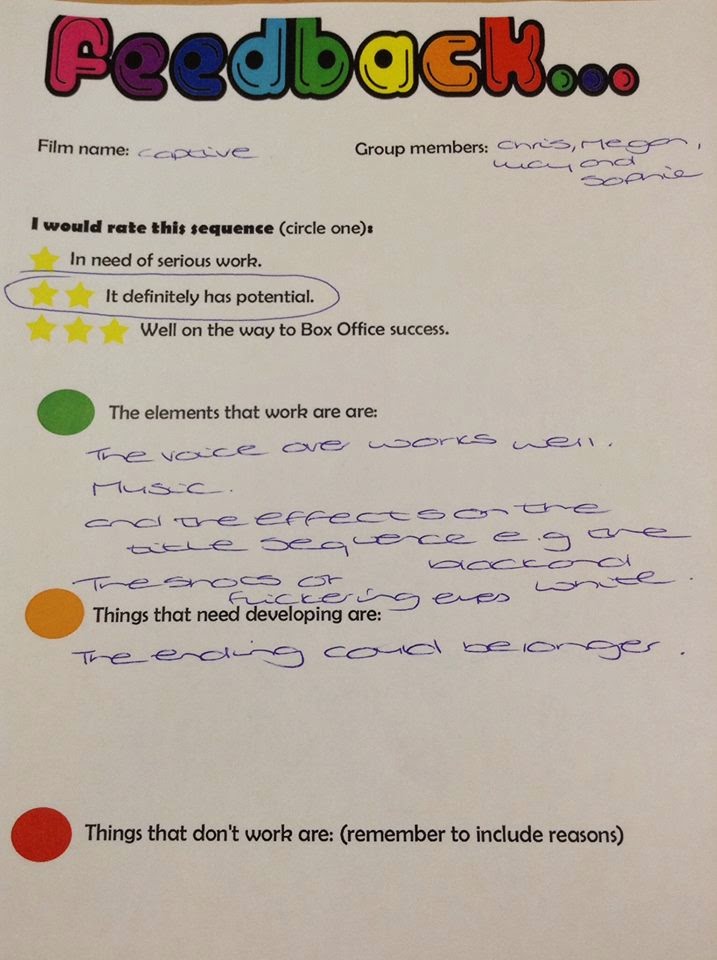
Overall from the lesson, we decided to change some things in our title sequence because of this feedback. We decided to take out the voiceover and it seemed too contrasting to the title sequence and the atmosphere in the sequence that we was trying to achieve. Secondly, we realised that we didn't give the Doctor enough footage to show that he actually is one, so we reshooted to get some clips of Christian behaving more like the role he's supposed to be.
Overall from the lesson, we decided to change some things in our title sequence because of this feedback. We decided to take out the voiceover and it seemed too contrasting to the title sequence and the atmosphere in the sequence that we was trying to achieve. Secondly, we realised that we didn't give the Doctor enough footage to show that he actually is one, so we reshooted to get some clips of Christian behaving more like the role he's supposed to be.
Tuesday, 11 March 2014
Sound Effects
When two members of the group went on a school trip, Me and Chris were left in lesson so we decided to look into sound for our title sequence. Our voiceover is almost done and our soundtrack has been picked so we decided to look at sound effects for some parts of our sequence.
Chris found this 'Jump' sound from a copyright free website and we both thought it would fit well into the ending of our sequence when the doctor's hand covers the screen. We added this onto our title sequence and it fit perfectly and was exactly what we was looking for. I think its made our title sequence sound more professional using sound effects and the cut being more effective, especially when it's one of our most important cuts.
Chris found this 'Jump' sound from a copyright free website and we both thought it would fit well into the ending of our sequence when the doctor's hand covers the screen. We added this onto our title sequence and it fit perfectly and was exactly what we was looking for. I think its made our title sequence sound more professional using sound effects and the cut being more effective, especially when it's one of our most important cuts.
 |
We have decided to place this sound effect at this part of the title sequence, to try and show that the doctor is not grabbing Maria as a friendly gesture and that he's perhaps a dangerous man. |
Screen Credits cont.
Our group decided that our title should have an individual feel to it, so we decided to create a stop animation of a cage dropping onto the text of the title in the title sequence. In lesson Sophie begun making this and had struggle with getting the background transparent on screen. Me and Sophie then researched and found out we was using the wrong format, we was using JPEG which flattens the image and not PNG which was what we needed. Fortunately this error didn't make any of our time go to waste and we just used a magic wand and resaved the work.

We also found struggle with the colour of text on screen, so Sophie decided to make the jail bars a faint grey and the text on screen being white, which works well when our original plan was for it to be black. We are finding Photoshop fairly simple when we worked on the title in Monday's lesson but I feel like this will be one of our strongest points in our title sequence because Sophie seems like the right person to be doing this job.
I think the stop animation will be success when we create all of the PNG for it. I'm glad our teacher suggested this idea because I feel like our title sequence name would not have stand out as much as it will do now. It is also nice that we have different editing techniques in our title sequence.
Editing
Since returning back to school I have been put in charge of editing all our clips together. Since doing this I have realised that our strongest cuts were those that were took outside rather than the inside shots. Due to the feedback we received from our teachers we decided to reshoot some of the shots towards the beginning of the title sequence.
When removing Megan's parts we decided to work on the image of the shots. As Thrillers usually have dark storylines, we decided to create the sequence in black and white. I think this is the best method for us as we filmed our work in the light to get clear detail of our characters on shot. The black and white editing blocks off the sense of it because a sunny day which it was.


When removing Megan's parts we decided to work on the image of the shots. As Thrillers usually have dark storylines, we decided to create the sequence in black and white. I think this is the best method for us as we filmed our work in the light to get clear detail of our characters on shot. The black and white editing blocks off the sense of it because a sunny day which it was.
To create that sharp and dark black and white, I used the filters 'saturation' and levels'
The saturation has been set to -1 so there is no colour left and to brighten up the black and white I decided to play around with the levels.
For the levels of the clips I used:
- Input: 50
- Input Tolerance: 100
- Gamma: 1.41
- Output: 43
- Output Tolerance: 68
I also added transitions to the individual clips so the clips cut smoothly together. The transitions I used were 'cross dissolve' but I may change this when we have our finalised clips on final cut. I feel like the cross dissolve works well for our clips because a few seconds are being passed between each cut when the doctor is following Maria.
Despite the reshooting of some of the clips, I am feeling quite confident with the editing of our title sequence. I feel as if we have a wide range of editing techniques played in our title sequence and the reshooting will be fairly easy for our group as we know what style we're going for. Most of the shots were correctly done and cut well together which I was worrying about before starting my editing in Final Cut. I think our Continuity workshop at the beginning of the year was really beneficial to me because I felt more confident when using the tools on the programme.
Monday, 10 March 2014
Screen Credits
Whilst I've been putting our clips together in order and been cutting them, Sophie has been creating the text to overlay our title sequence.
 Sophie made the text on screen using photoshop using a special film and video design template. On this template she made the different texts which are going to be on screen using the font we picked from the copyright free website "dafont". I think the text looks really effective and I like the way Sophie has positioned the text, the only problem our group is worrying about is if the video on screen will be too dark to see the white text. Me and Sophie worked together to figure out how to change image and text colour white from dafont and now we're confident with how our text on screen is going, I think it is going to look really good with our cuts and matches the genre we're going for really well.
Sophie made 16 different texts in photoshop in the order of how the 'SE7EN' sequence goes. She then used names of the people who have done work in other Thriller films we looked at in our survey. For example 'John Polson' is our director on screen who was the director for Hide and Seek.
Sophie made text for the following:
Sophie made the text on screen using photoshop using a special film and video design template. On this template she made the different texts which are going to be on screen using the font we picked from the copyright free website "dafont". I think the text looks really effective and I like the way Sophie has positioned the text, the only problem our group is worrying about is if the video on screen will be too dark to see the white text. Me and Sophie worked together to figure out how to change image and text colour white from dafont and now we're confident with how our text on screen is going, I think it is going to look really good with our cuts and matches the genre we're going for really well.Sophie made 16 different texts in photoshop in the order of how the 'SE7EN' sequence goes. She then used names of the people who have done work in other Thriller films we looked at in our survey. For example 'John Polson' is our director on screen who was the director for Hide and Seek.
Sophie made text for the following:
- Production company
- Cast
- Title of film
- Casting by
- Music by
- Costume designer
- Production design
- Director of photography
- Co-producers
- Co executive producer
- Executive producer
- Written by
- Produced by
- Directed by
Subscribe to:
Posts (Atom)