Friday, 4 April 2014

Tuesday, 1 April 2014
Small final changes to the title sequence
Bad film:
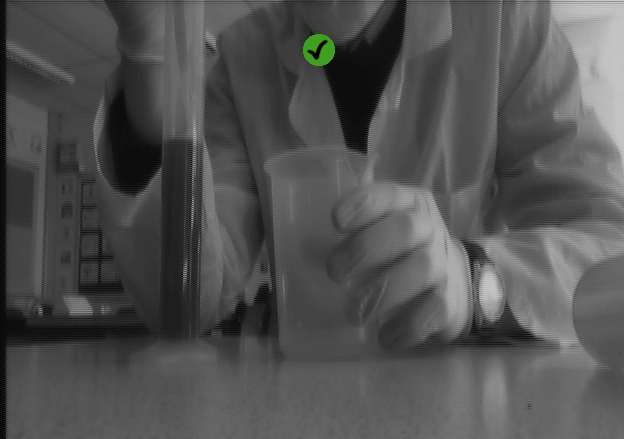 After adding our new clips to our title sequence to show that Christian plays a doctor role and to make our character look more medical, we decided to add a 'bad film' filter to this piece to show that this is a past flashback of the Doctor's career to introduce the audience to the character but the first clips and his workplace is slightly irrelevant to the title sequence's plot.
As a summary we added the bad film filter to present the character's occupation for a better understanding for the rest of the title sequence, however this is trying to be shown in past flashback so there is less confusion that the setting of the Doctor's workplace is not seen by the second character, Maria.
Change of editing:
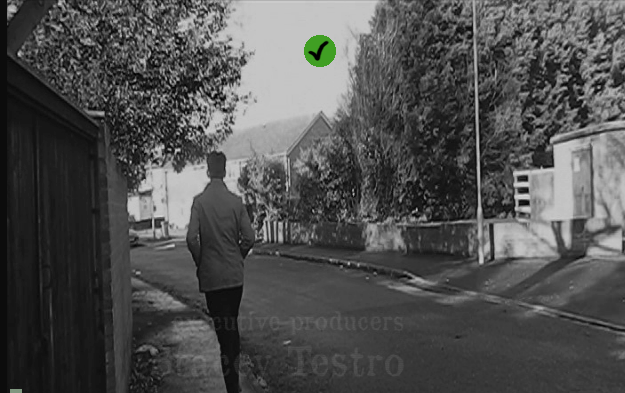 Lastly we also decided to change the editing of the Doctor walking along the street following Maria slightly. Before the change, the doctor's footsteps were repeated and a dissolve transition was used to follow this repeat on the title sequence. We decided to take this out because it gave the doctor a view that he is perhaps not alive and a ghostly feel to the character. We found it too supernatural so we changed it to fast jump cuts to represent eager towards catching up with Maria instead of the repeated steps which did not really fit in with the atmosphere we was going for.
I'm glad we made these final changes to our title sequence because adding and removing some of the techniques we used has made the title sequence slightly more understanding and more fitting for the theme of Thriller that we were aiming for.
After adding our new clips to our title sequence to show that Christian plays a doctor role and to make our character look more medical, we decided to add a 'bad film' filter to this piece to show that this is a past flashback of the Doctor's career to introduce the audience to the character but the first clips and his workplace is slightly irrelevant to the title sequence's plot.As a summary we added the bad film filter to present the character's occupation for a better understanding for the rest of the title sequence, however this is trying to be shown in past flashback so there is less confusion that the setting of the Doctor's workplace is not seen by the second character, Maria.
Change of editing:
Lastly we also decided to change the editing of the Doctor walking along the street following Maria slightly. Before the change, the doctor's footsteps were repeated and a dissolve transition was used to follow this repeat on the title sequence. We decided to take this out because it gave the doctor a view that he is perhaps not alive and a ghostly feel to the character. We found it too supernatural so we changed it to fast jump cuts to represent eager towards catching up with Maria instead of the repeated steps which did not really fit in with the atmosphere we was going for.I'm glad we made these final changes to our title sequence because adding and removing some of the techniques we used has made the title sequence slightly more understanding and more fitting for the theme of Thriller that we were aiming for.
Tuesday, 25 March 2014
Communication outside of school
Throughout the months of preparing and planning our title sequence we have communicated outside school as a group using a Facebook chat. This has helped us a lot as we did our group analysis on it and also planned the dates which are on our production plan on it.


The complete Voiceover
This is the voiceover that used to be on the title sequence, I like the voiceover as a whole and i'm disappointed that it doesn't fit well with the title sequence as a whole. I think it sounds professional because we recorded it in the music studio in school so it was clear and easy to edit. Christian edited the voiceover on Logic Pro on a MAC to create a mysterious feel to the speech, it was also slowed down to fit more into the title sequence and to space out. The speech was also cut so the two characters took turns saying a part of the script instead of all at once like it was recorded.
I think this was a successful piece of work but our title sequence soundtrack 'Dangerous Knowledge' was more effective without voiceover over the top.
Reshooting
 Due to the lack of time we had, we decided to go to the science tech room and pick up some science like objects that a Doctor may use and filmed in a science classroom due to the lack of time we have to get our coursework altogether. Despite filming in school, I think the image we got from filming in a science classroom looked better than what we could have made look professional outside school. In total we took 7 clips that were successful but when putting the title sequence together it made the length of it 10 seconds longer which made us more comfortable with the length as we learnt that the minimum time is 1.30 minutes and we had 1.36 minutes.
I think this reshoot has made our title sequence more successful and shows Christian's character more clearly that he's a doctor or gives the audience the hint that Christian plays a medical and more older character.
Class Feedback
In class we showed the other students our title sequence and received coursework from other people in the lesson and the teacher. I think our feedback has helped me a lot and everyone's ideas were supportive. We handed out feedback sheets and gave them to the class to fill out and these were our results.


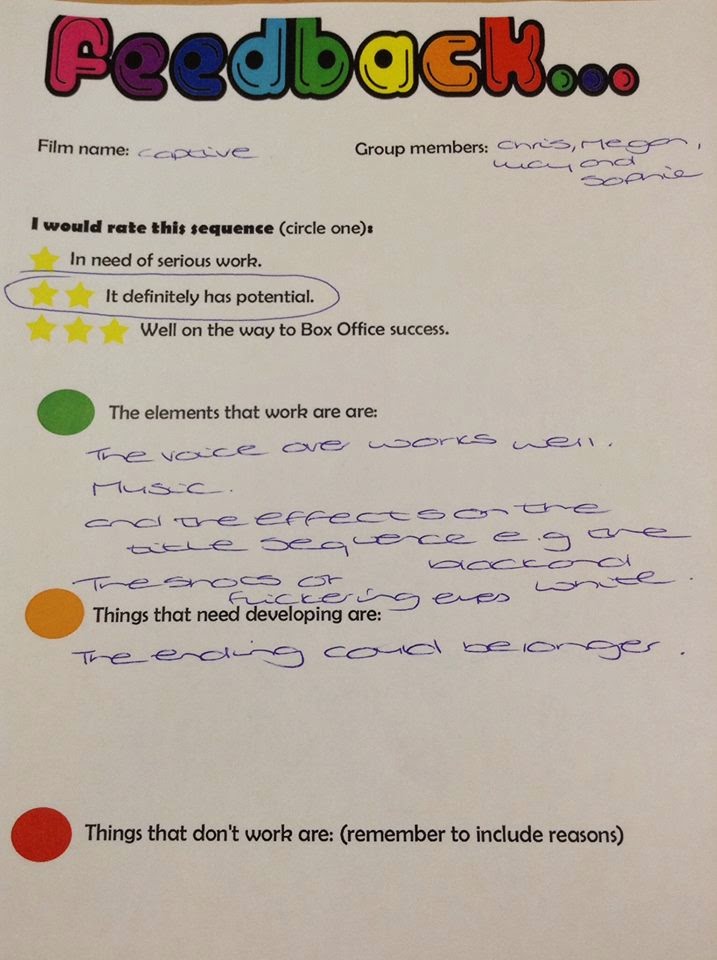
Overall from the lesson, we decided to change some things in our title sequence because of this feedback. We decided to take out the voiceover and it seemed too contrasting to the title sequence and the atmosphere in the sequence that we was trying to achieve. Secondly, we realised that we didn't give the Doctor enough footage to show that he actually is one, so we reshooted to get some clips of Christian behaving more like the role he's supposed to be.
Overall from the lesson, we decided to change some things in our title sequence because of this feedback. We decided to take out the voiceover and it seemed too contrasting to the title sequence and the atmosphere in the sequence that we was trying to achieve. Secondly, we realised that we didn't give the Doctor enough footage to show that he actually is one, so we reshooted to get some clips of Christian behaving more like the role he's supposed to be.
Tuesday, 11 March 2014
Sound Effects
When two members of the group went on a school trip, Me and Chris were left in lesson so we decided to look into sound for our title sequence. Our voiceover is almost done and our soundtrack has been picked so we decided to look at sound effects for some parts of our sequence.
Chris found this 'Jump' sound from a copyright free website and we both thought it would fit well into the ending of our sequence when the doctor's hand covers the screen. We added this onto our title sequence and it fit perfectly and was exactly what we was looking for. I think its made our title sequence sound more professional using sound effects and the cut being more effective, especially when it's one of our most important cuts.
Chris found this 'Jump' sound from a copyright free website and we both thought it would fit well into the ending of our sequence when the doctor's hand covers the screen. We added this onto our title sequence and it fit perfectly and was exactly what we was looking for. I think its made our title sequence sound more professional using sound effects and the cut being more effective, especially when it's one of our most important cuts.
 |
We have decided to place this sound effect at this part of the title sequence, to try and show that the doctor is not grabbing Maria as a friendly gesture and that he's perhaps a dangerous man. |
Screen Credits cont.
Our group decided that our title should have an individual feel to it, so we decided to create a stop animation of a cage dropping onto the text of the title in the title sequence. In lesson Sophie begun making this and had struggle with getting the background transparent on screen. Me and Sophie then researched and found out we was using the wrong format, we was using JPEG which flattens the image and not PNG which was what we needed. Fortunately this error didn't make any of our time go to waste and we just used a magic wand and resaved the work.

We also found struggle with the colour of text on screen, so Sophie decided to make the jail bars a faint grey and the text on screen being white, which works well when our original plan was for it to be black. We are finding Photoshop fairly simple when we worked on the title in Monday's lesson but I feel like this will be one of our strongest points in our title sequence because Sophie seems like the right person to be doing this job.
I think the stop animation will be success when we create all of the PNG for it. I'm glad our teacher suggested this idea because I feel like our title sequence name would not have stand out as much as it will do now. It is also nice that we have different editing techniques in our title sequence.
Editing
Since returning back to school I have been put in charge of editing all our clips together. Since doing this I have realised that our strongest cuts were those that were took outside rather than the inside shots. Due to the feedback we received from our teachers we decided to reshoot some of the shots towards the beginning of the title sequence.
When removing Megan's parts we decided to work on the image of the shots. As Thrillers usually have dark storylines, we decided to create the sequence in black and white. I think this is the best method for us as we filmed our work in the light to get clear detail of our characters on shot. The black and white editing blocks off the sense of it because a sunny day which it was.


When removing Megan's parts we decided to work on the image of the shots. As Thrillers usually have dark storylines, we decided to create the sequence in black and white. I think this is the best method for us as we filmed our work in the light to get clear detail of our characters on shot. The black and white editing blocks off the sense of it because a sunny day which it was.
To create that sharp and dark black and white, I used the filters 'saturation' and levels'
The saturation has been set to -1 so there is no colour left and to brighten up the black and white I decided to play around with the levels.
For the levels of the clips I used:
- Input: 50
- Input Tolerance: 100
- Gamma: 1.41
- Output: 43
- Output Tolerance: 68
I also added transitions to the individual clips so the clips cut smoothly together. The transitions I used were 'cross dissolve' but I may change this when we have our finalised clips on final cut. I feel like the cross dissolve works well for our clips because a few seconds are being passed between each cut when the doctor is following Maria.
Despite the reshooting of some of the clips, I am feeling quite confident with the editing of our title sequence. I feel as if we have a wide range of editing techniques played in our title sequence and the reshooting will be fairly easy for our group as we know what style we're going for. Most of the shots were correctly done and cut well together which I was worrying about before starting my editing in Final Cut. I think our Continuity workshop at the beginning of the year was really beneficial to me because I felt more confident when using the tools on the programme.
Monday, 10 March 2014
Screen Credits
Whilst I've been putting our clips together in order and been cutting them, Sophie has been creating the text to overlay our title sequence.
 Sophie made the text on screen using photoshop using a special film and video design template. On this template she made the different texts which are going to be on screen using the font we picked from the copyright free website "dafont". I think the text looks really effective and I like the way Sophie has positioned the text, the only problem our group is worrying about is if the video on screen will be too dark to see the white text. Me and Sophie worked together to figure out how to change image and text colour white from dafont and now we're confident with how our text on screen is going, I think it is going to look really good with our cuts and matches the genre we're going for really well.
Sophie made 16 different texts in photoshop in the order of how the 'SE7EN' sequence goes. She then used names of the people who have done work in other Thriller films we looked at in our survey. For example 'John Polson' is our director on screen who was the director for Hide and Seek.
Sophie made text for the following:
Sophie made the text on screen using photoshop using a special film and video design template. On this template she made the different texts which are going to be on screen using the font we picked from the copyright free website "dafont". I think the text looks really effective and I like the way Sophie has positioned the text, the only problem our group is worrying about is if the video on screen will be too dark to see the white text. Me and Sophie worked together to figure out how to change image and text colour white from dafont and now we're confident with how our text on screen is going, I think it is going to look really good with our cuts and matches the genre we're going for really well.Sophie made 16 different texts in photoshop in the order of how the 'SE7EN' sequence goes. She then used names of the people who have done work in other Thriller films we looked at in our survey. For example 'John Polson' is our director on screen who was the director for Hide and Seek.
Sophie made text for the following:
- Production company
- Cast
- Title of film
- Casting by
- Music by
- Costume designer
- Production design
- Director of photography
- Co-producers
- Co executive producer
- Executive producer
- Written by
- Produced by
- Directed by
Tuesday, 4 March 2014
Feedback
When returning back from half term, we gathered helpful feedback from two of our teachers since we put a rough edit together with our footage, we only ended up using less than half of the footage that we talk as when looking at it on a clearer desktop we found noticeable errors, for example shadows. Our group has took in our teacher's feedback and ways to improve well and we will be developing our work using their ideas.
Emily: Emily suggested for us to change the first half of our title sequence as there are contrasting paces in our title sequence, she also thought that the first half of the characters getting ready were poorly shot lighting wise so our group has decided to reshoot our shots of the two characters getting ready. Emily was also keen of the music that our group selected together and thinks it works well with the thriller genre and the 'chasing / following' feel we are going for in the title sequence. She also suggested where we should place our voiceover and some extra shots we should add.
Sinead: Sinead didn't find a problem as much with the pace of our title sequence as a whole but still thinks we should reshoot some of our footage which we have now understood is understandable considering the quality and lighting change throughout the title sequence. Sinead also approved of the music choice. Sinead also suggested for the two characters having strong differences between them so the audience doesn't get too confused with what is happening.
Overall, I feel as if the feedback was helpful and we need what we need to do in order to improve our work.
Emily: Emily suggested for us to change the first half of our title sequence as there are contrasting paces in our title sequence, she also thought that the first half of the characters getting ready were poorly shot lighting wise so our group has decided to reshoot our shots of the two characters getting ready. Emily was also keen of the music that our group selected together and thinks it works well with the thriller genre and the 'chasing / following' feel we are going for in the title sequence. She also suggested where we should place our voiceover and some extra shots we should add.
Sinead: Sinead didn't find a problem as much with the pace of our title sequence as a whole but still thinks we should reshoot some of our footage which we have now understood is understandable considering the quality and lighting change throughout the title sequence. Sinead also approved of the music choice. Sinead also suggested for the two characters having strong differences between them so the audience doesn't get too confused with what is happening.
Overall, I feel as if the feedback was helpful and we need what we need to do in order to improve our work.
Start of filming
Luckily we found some time before breaking up to film the start of our title sequence in our lesson. We only took one shot as the preparation for the setting took time to look good. We went to a teacher's conference room as it supplied most of the props which we needed for that specific shot. We decided to take shots in there for the Doctor's study, and we will need to go back there when we return to school after half term.


We then continued filming the following week and I feel like we got a lot done in 2 days, we got 114 clips altogether and I feel like most of them were successful.
Day 1: On our first day we went to Megan's house to film, at Megan's we filmed all the indoor shots that we needed for our title sequence. This day, we recorded Maria's pan shots and the diary and both of the characters getting ready to leave the house.
Day 2: On the second day we went to my house to film the remaining indoor shots and the outside shots, we decided to go to my house to film outdoors as there is a quiet close near my house with barely any passing traffic. This day we finished recording Maria's getting ready to go out shots and the tracking and point of view shots of the Doctor following Maria when she leaves.
Luckily the day after filming on the first day, the weather was not rainy or windy so the shots are bright and clear which our group was happy about, we needed these shots to be dark but we learned that shooting in the light and editing it to a darker time of the day would be a more effective way of taking the shots for the title sequences.
Thursday, 20 February 2014
Voiceover
 Before breaking up for half term we decided to record our voiceovers for our title sequence. We made a short script which are meant to be parts of the 2 main characters journals/dairies. Christian did the voice for the man and Sophie did the voice for the girl. We went to a recording studio in the music department in the school so we could clearly pick up the audio through a microwave onto Logic Pro onto the Mac.
 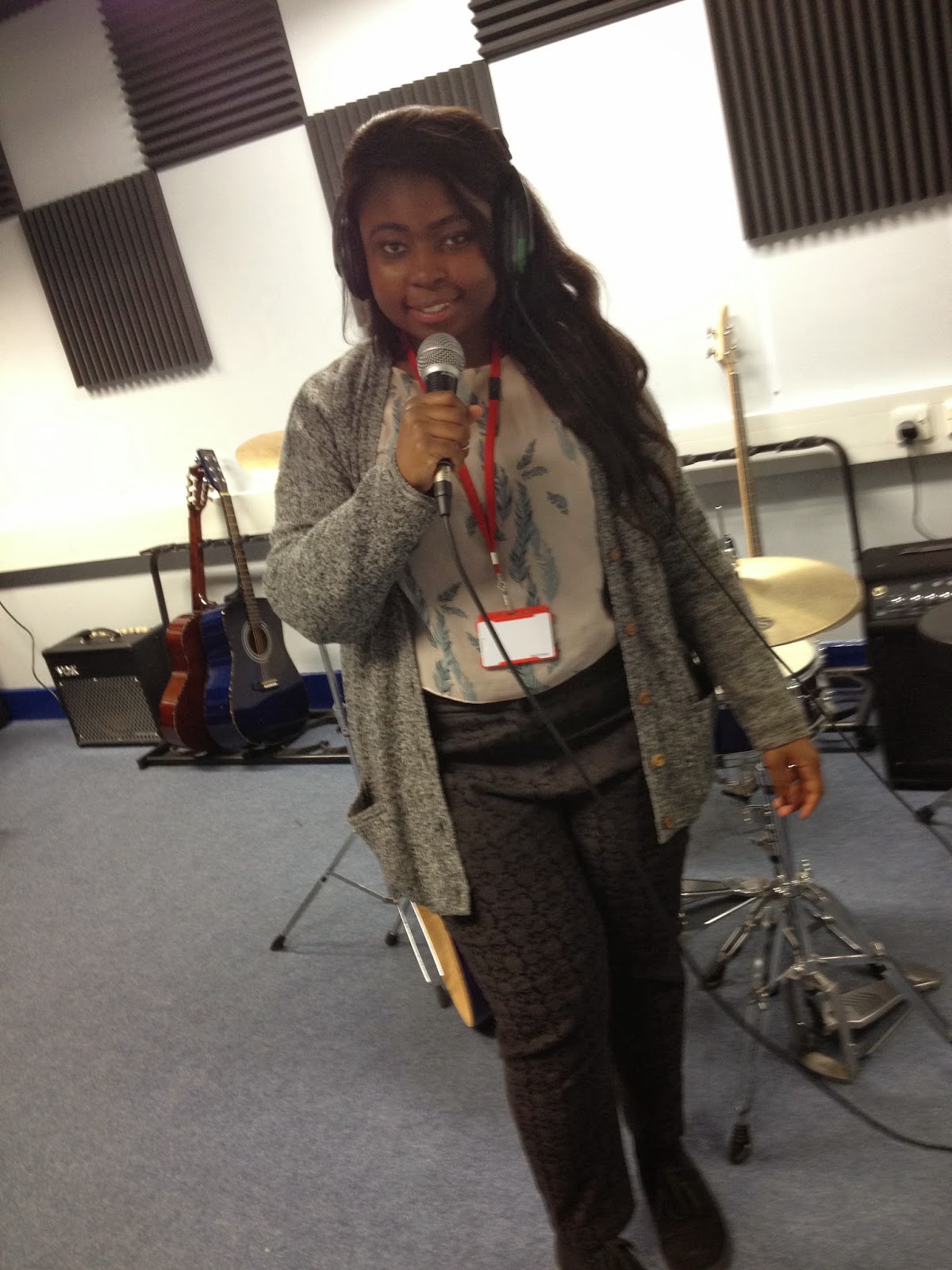 Doing it on Logic Pro allowed us to play around with the audio, we added a echo and distorted effect onto the audios to try and create a sense to the audience that these journals are being read within their minds and their looking back in the past. i think our voiceovers are really good and i'm proud of what they've come out like because the Logic effects made the audio sound more professional and more fitting into our genre.
I'm happy we pretty much completed our voiceovers for our title sequence before breaking up because that gives our group one less thing to do when we have filmed our title sequence and allows us more time to edit it and perfect it. We also started looking into other sound for our title sequence, we looked at some copyright free music on https://audionetwork.lgfl.org.uk to get an idea of the type of music we'd want for the rest of our title sequence. We still have not yet picked one for our title sequence and will probably finalise one after half term.
Wednesday, 12 February 2014
Production Plan Update

We have been updating the calendar as a group and this makes me feel more comfortable with our time scheme. I think it's good how our group is sorting out the music before breaking up for half term (14th feb - 24th feb) so we are left with editing to do when we get back from half term. We haven't yet decided when we will do the editing on final cut when we get back from half term so this is something we need to discuss this week or during half term.
Tuesday, 11 February 2014
Mise-en-scene in title sequence
I have created another brainstorm on bubbl.us to point out the essential props for the two characters, location. I also added a small list of the mostly used camerashots and editing techniques which would be used in the title sequence.

This is most likely not a complete list of props that we will use but these are the props that are seen in the storyboard and would most likely make our title sequence look less effective without.
Stills of Storyboard
Due to Prezi being unable to work on my blog, I decided to upload the stills individually so they are still on my blog to look back on and to show my progress of the title sequence. I have put small points with these images as they are quite unclear but only briefly because I added more description on the Prezi.


Page one shows:
First chunk of contrasting pan-shots of Maria and the doctor
The Diary opened and closed
Close up of main characters eye
Page two shows:
Second chunk of contrasting pan-shots
Characters leaving their current settings
Page three shows:
Over the shoulder shots of Maria walking, being watched
More close ups of eyes
Page four shows:
Maria being followed
Doctor revealed as being the stalker
More close up shots for suspense
Page five shows:
Doctor being closer to Maria
Close up of someone grabbing Maria's mouth
Page six shows:
Distorted fast pace change of stills showing Maria's state of mind
Prezi of Storyboard
I decided to create a Prezi for my storyboard so I could write beside each page briefly of what we are trying to achieve. I thought it would look more visually interesting and clearly if I presented our storyboard in a different way than posting the images. However, I have had a problem with embeding the Prezi onto my blog because the HTML seems to fail which has annoyed me.
http://prezi.com/doefeuqa8yy6/captive-storyboard/#
I have added the link on here but I am still disappointed about the Prezi not loading onto my blog correctly. I found the layout to the Prezi fitting to my title sequence as the slides go along with footprints which could suggest being followed / stalking / chase before even reading what the slides contain in them. I found Prezi difficult to use compared to Microsoft Powerpoint but I prefer the appearance of the presentation of Prezi despite it taking longer to prepare.
Screenshots:


http://prezi.com/doefeuqa8yy6/captive-storyboard/#
I have added the link on here but I am still disappointed about the Prezi not loading onto my blog correctly. I found the layout to the Prezi fitting to my title sequence as the slides go along with footprints which could suggest being followed / stalking / chase before even reading what the slides contain in them. I found Prezi difficult to use compared to Microsoft Powerpoint but I prefer the appearance of the presentation of Prezi despite it taking longer to prepare.
Screenshots:
Zoom In and Zoom Out practice shots
After doing the pan-shot we also did Zoom In and Zoom out shots. I was really pleased how these came out because I think the focus on the writing on the paper is effective and works smoothly. I expected the zoom to react faster but the speed that it increased and decreased was a good speed for what we want in the scene. We are going to use these shots when Maria and the doctor and writing in their diaries near the beginning of the title sequence.
This is the first attempt at an over the shoulder Zoom In, I think as a first attempt this was successful and that hopefully when filming our title sequence our Zoom in will be even better than this one after playing around with the camera throughout this week.
And this is our over the shoulder Zoom out, I think the Zoom out looked more effective than the Zoom in despite being happy with how both of them are. The Zoom out shot is more central on the paper and then zooms back over her shoulder which is quite an effective way for the audience to acknowledge something significant on screen. As this was only our first attempts on both, I am certain me and my group will find a smooth way of zooming into the item in hand centrally.
This is the first attempt at an over the shoulder Zoom In, I think as a first attempt this was successful and that hopefully when filming our title sequence our Zoom in will be even better than this one after playing around with the camera throughout this week.
And this is our over the shoulder Zoom out, I think the Zoom out looked more effective than the Zoom in despite being happy with how both of them are. The Zoom out shot is more central on the paper and then zooms back over her shoulder which is quite an effective way for the audience to acknowledge something significant on screen. As this was only our first attempts on both, I am certain me and my group will find a smooth way of zooming into the item in hand centrally.
Practicing shots for title sequence
Our group is going to begin filming the shots for the title sequence next week during half term now the locations and props have been decided and the storyboard is finished. We decided to practice shots using the Steadicam which I found difficult and frustrating.
We decided to take a demo shot of our first shot of our title sequence, I think she worked well for a first attempt and when we film next week it will be better because we took this shot in a cramped area which made it hard to move with the camera.
I'm glad our group did some practicing with the pan shots because I have realised how difficult it is due to the weight of the Steadicam. We decided that we can't change the Steadicam for a Dolly because a lot of our scenes are quite closed in and low and the Steadicam is more ideal for that. We also found tightening the Steadicams for the different shots quite difficult aswell as there is many different places where you can loosen and tighten parts.
This is our first practice shot of our first scene of a pan-shot of the girl's legs underneath her desk. When filming this for the title sequence, the setting will be better dressed, darker and the actress (Megan) will be dressed to fit to the theme of our film.
We decided to take a demo shot of our first shot of our title sequence, I think she worked well for a first attempt and when we film next week it will be better because we took this shot in a cramped area which made it hard to move with the camera.
I'm glad our group did some practicing with the pan shots because I have realised how difficult it is due to the weight of the Steadicam. We decided that we can't change the Steadicam for a Dolly because a lot of our scenes are quite closed in and low and the Steadicam is more ideal for that. We also found tightening the Steadicams for the different shots quite difficult aswell as there is many different places where you can loosen and tighten parts.
This is our first practice shot of our first scene of a pan-shot of the girl's legs underneath her desk. When filming this for the title sequence, the setting will be better dressed, darker and the actress (Megan) will be dressed to fit to the theme of our film.
Monday, 10 February 2014
Production Plan
As a group we decided what dates we should film during the half term, since this screenshot we have also realised that we may need to film twice during the half term to get the outside footage and the inside footage done correctly. After starting dating all the things we need to do on a calendar, I feel more comfortable with our time scale and feel as if we're managing it well. We decided to do some filming this week so that we have access to the lighting equipment we needed which we couldn't take with us during half term, the rest of the filming will be done during the half term as we need to record by a street and inside houses to get a realistic feel to our title sequence.

Sophie made this calendar on Microsoft Outlook and then emailed it to all of us so we can add to it aswell. I think Outlook was the clearest and easiest way to create a calendar as we can all have access to it when we want and the weather warnings will also be handy when it comes to doing our outside filming.
Subscribe to:
Posts (Atom)